
How to install your own OS on a VDS?
If you have ordered a VDS (KVM) with the option "Other OS / Own ISO", you can deploy any operating system you need on the server, provided it does not conflict with the virtualization system.
To do this, log in to your personal account and navigate to the section "Services" - "My services". In the list of services, select the one where you want to deploy your operating system and click "More details" in the corresponding service row.
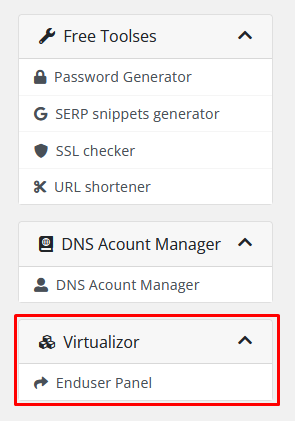
After the page with the full information about the ordered server loads, you need to open the hypervisor control panel. To do this, pay attention to the blocks with module actions on the left side of the screen and locate the "Virtualizor" block below.
Then simply click the "Enduser Panel" button in this block to access the full interface. There you will find the "ISO" section, where you need to upload the operating system image.